Prove the work
Time, location, photos and notes stay connected to the project.
Keep your own record of hours, location, photos, notes and pay assumptions. When employer or payroll figures do not match, you have something concrete to review and discuss.
DISPUTE does not determine legal wage entitlement or certify payroll accuracy.
Time, location, photos and notes stay connected to the project.
Estimate from your own recorded hours and configured rate assumptions.
Export selected records to PDF or CSV.
Choose the project, day type, location and Time In / Time Out. Website previews use consistent dummy project data — no TEST 2, TEST 3, absurd durations, notifications or private account information.
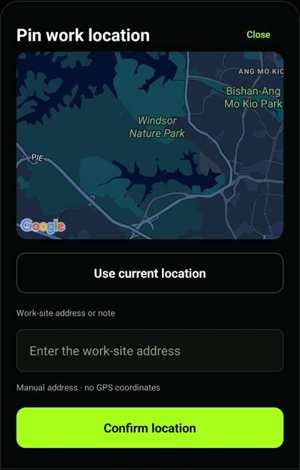
Use the in-app map, use current location or enter the work-site address manually, then confirm the location for the work record.
Classify evidence as Doing work, Completed work, Defect or Others. Add a short note explaining what the photo records.
DISPUTE keeps recorded time together with currency, rate basis, normal hours and configured overtime/off-day/holiday multipliers. Report calculations can use those records and settings to produce an estimated amount.
When the employer or payroll figure differs, review the dates, hours, breaks, day types and rate assumptions before confirming, discussing or negotiating the difference.
Choose the project, date range and record types, then export for your own review or sharing.
Export a DISPUTE JSON backup from local work records and confirmed settings.
Keep a durable backup before changing phone, clearing app data or uninstalling.No deletion panel, privacy text, phone notifications or unrelated settings in the product preview.
The website and Android app use the same DISPUTE account backend. Register and verify here, then use the same credentials on mobile.